TokenBBQ — Track AI Coding Token Usage in One Dashboard
After hitting token limits repeatedly without knowing where my tokens went, I built TokenBBQ. A simple dashboard that reads local log files and shows token usage patterns.
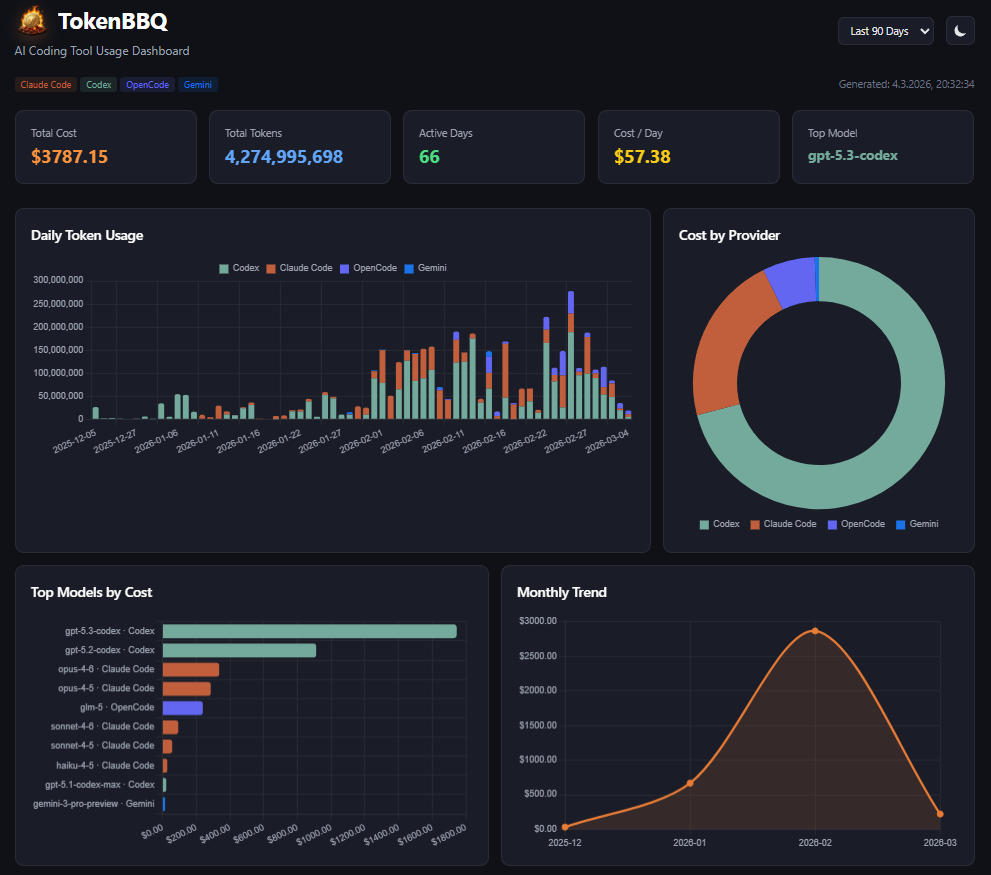
All Your AI Coding Tools. One View.
TokenBBQ automatically detects which tools you have installed. If the data exists on your machine, it gets parsed.
Claude Code
~/.claude/projects/**/*.jsonl
OpenAI Codex
~/.codex/sessions/**/*.jsonl
Gemini CLI
~/.gemini/tmp/**/chats/session-*.json
OpenCode
~/.local/share/opencode/storage/**/*.json
Amp
~/.local/share/amp/threads/**/*.json
Pi-Agent
~/.pi/agent/sessions/**/*.jsonl
Every Angle on Your Token Usage
Built for developers who want actual data, not just totals.
Daily Token Timeline
Daily token usage stacked by provider. Spot billing spikes before they show up on your statement.
Provider Breakdown
Donut chart showing exact cost split across all your coding agents. Know which tool is eating your budget.
Top Models Ranking
Top 10 models ranked by total cost. Know exactly which model is most expensive across all your tools.
Monthly Spending Trend
Month-over-month chart. Track whether your AI costs are climbing, stable, or dropping.
Activity Heatmap
GitHub-style 90-day heatmap. See which days you hammered the APIs and find your usage patterns.
CLI + JSON Export
Terminal tables, JSON export, and a compact summary mode. Every format, every workflow.
Your Data Stays on Your Machine
Your AI tool logs contain code context, session data, and project names. TokenBBQ never sends any of it anywhere.
- All data stays local — Reads files on your filesystem, serves a dashboard on localhost
- No accounts, no keys — Nothing to sign up for. No API keys, no environment variables
- MIT licensed — The entire codebase is on GitHub. Read it, audit it, fork it
See Where Your Tokens Go
One command. Local only. No setup. Takes seconds.